Skip to content
Pandus

Accessibility checks for online shops

An accessible shop is one where every customer can find, choose and pay for a product, including people with low vision, a screen reader, a keyboard instead of a mouse, or a phone in the sun. First find out whether the law applies to you. Then fix what stops an order, not what is merely wrong.

  • Shopify, WooCommerce, PrestaShop, Shoptet
  • Automated check, not an audit

How it looks

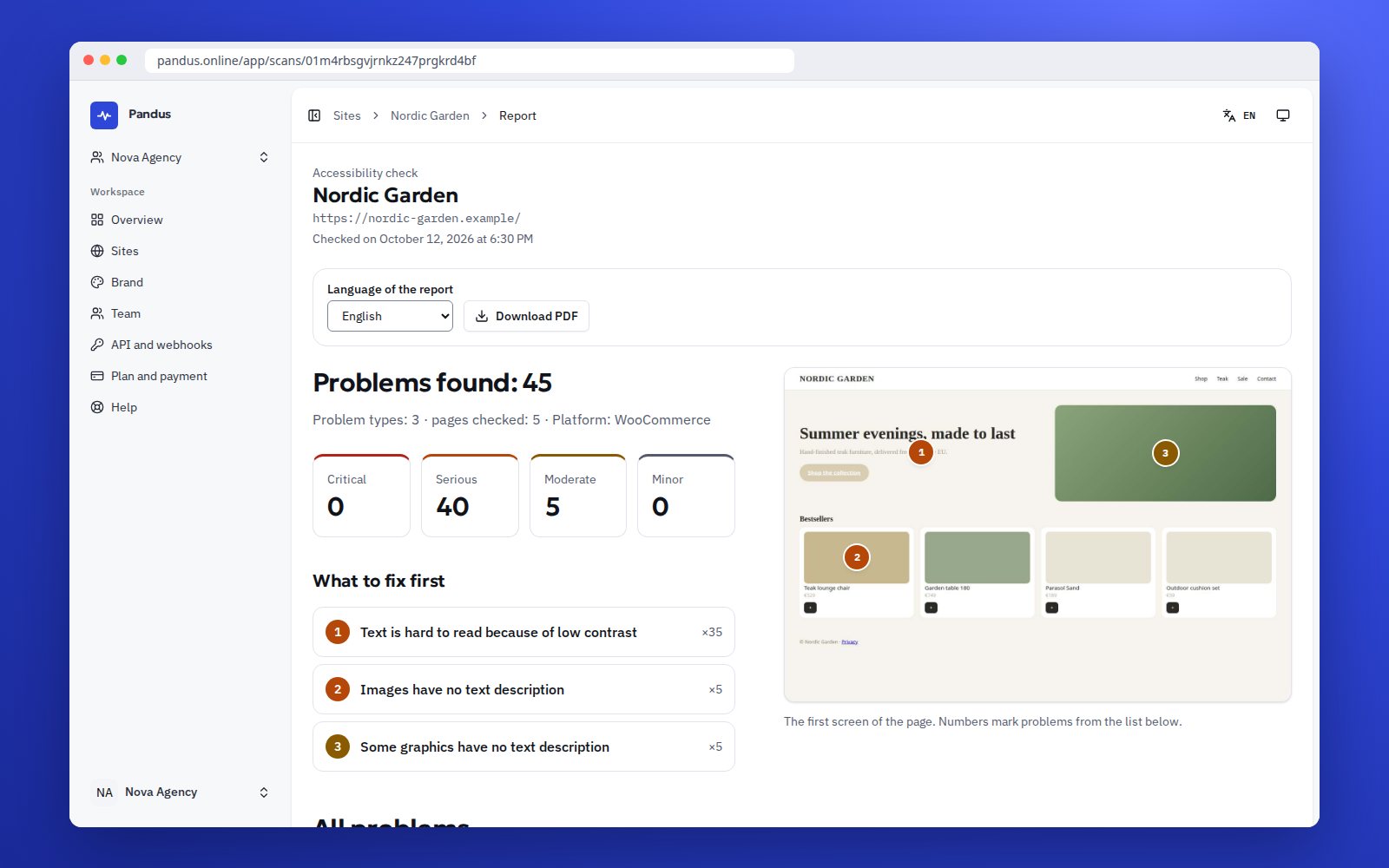
The report for the owner: what to fix first, with a screenshot of the page
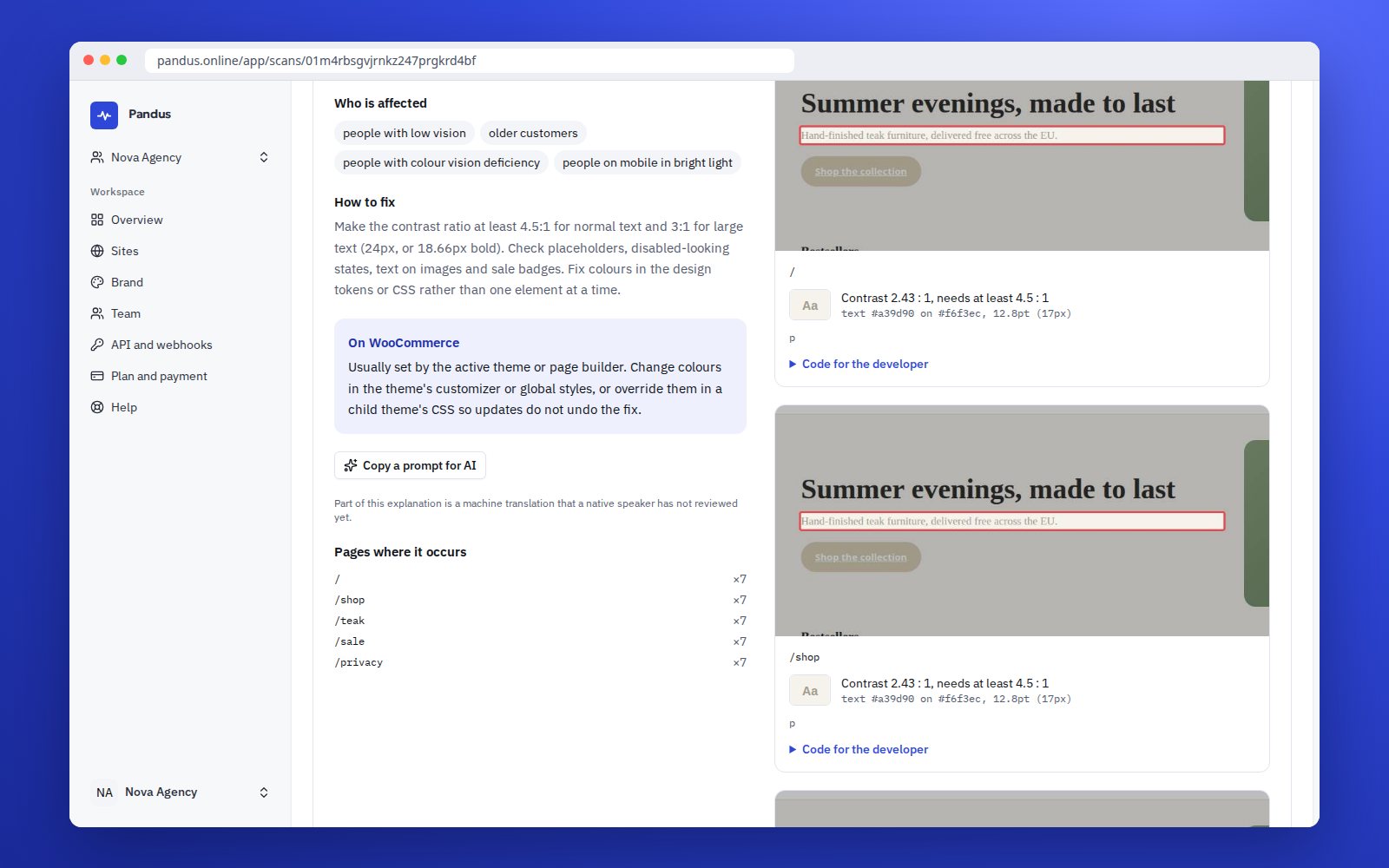
Each problem explained in plain words, with how to fix it on the platform
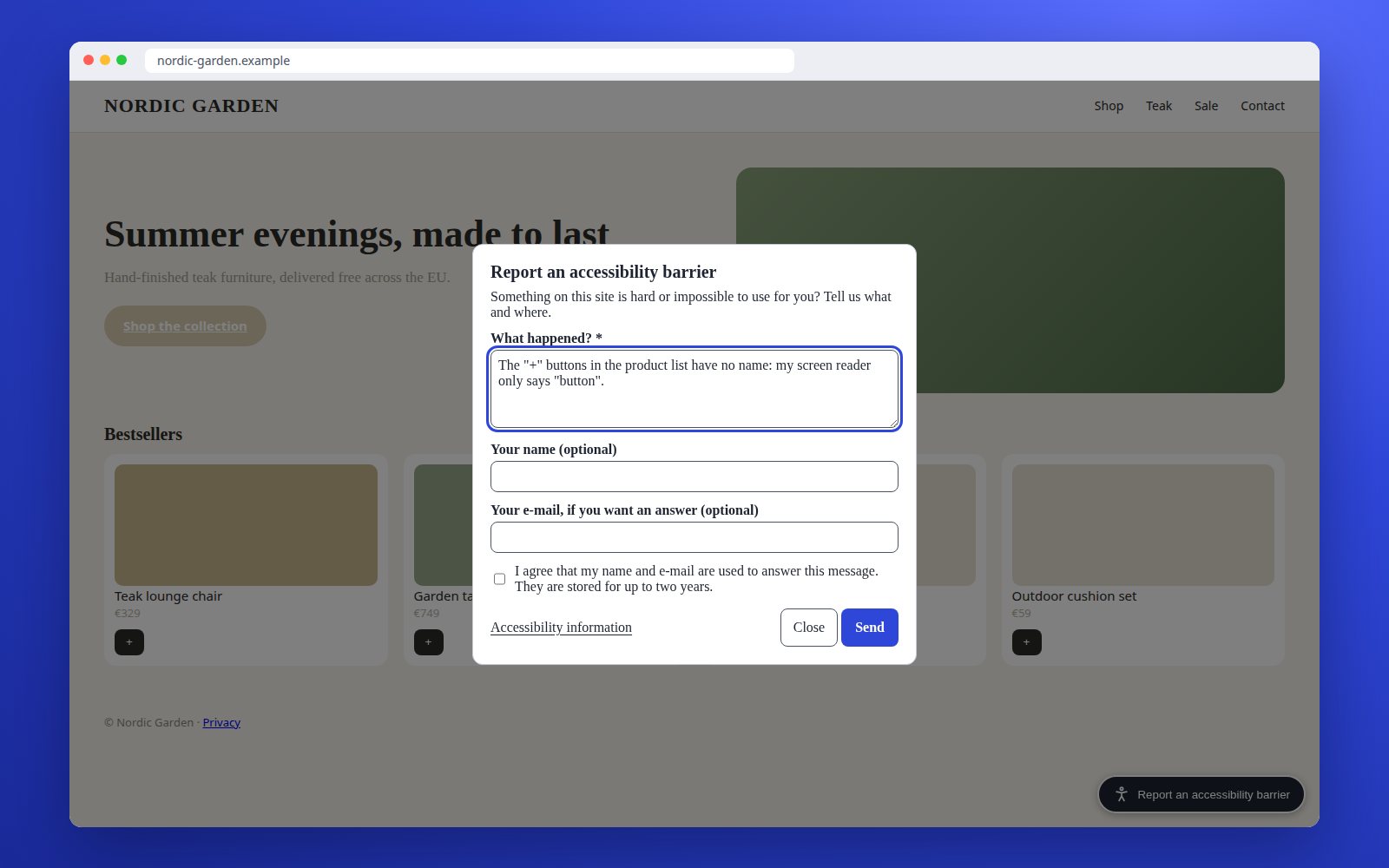
The "Report a barrier" form on a shop, opened from the button in the corner
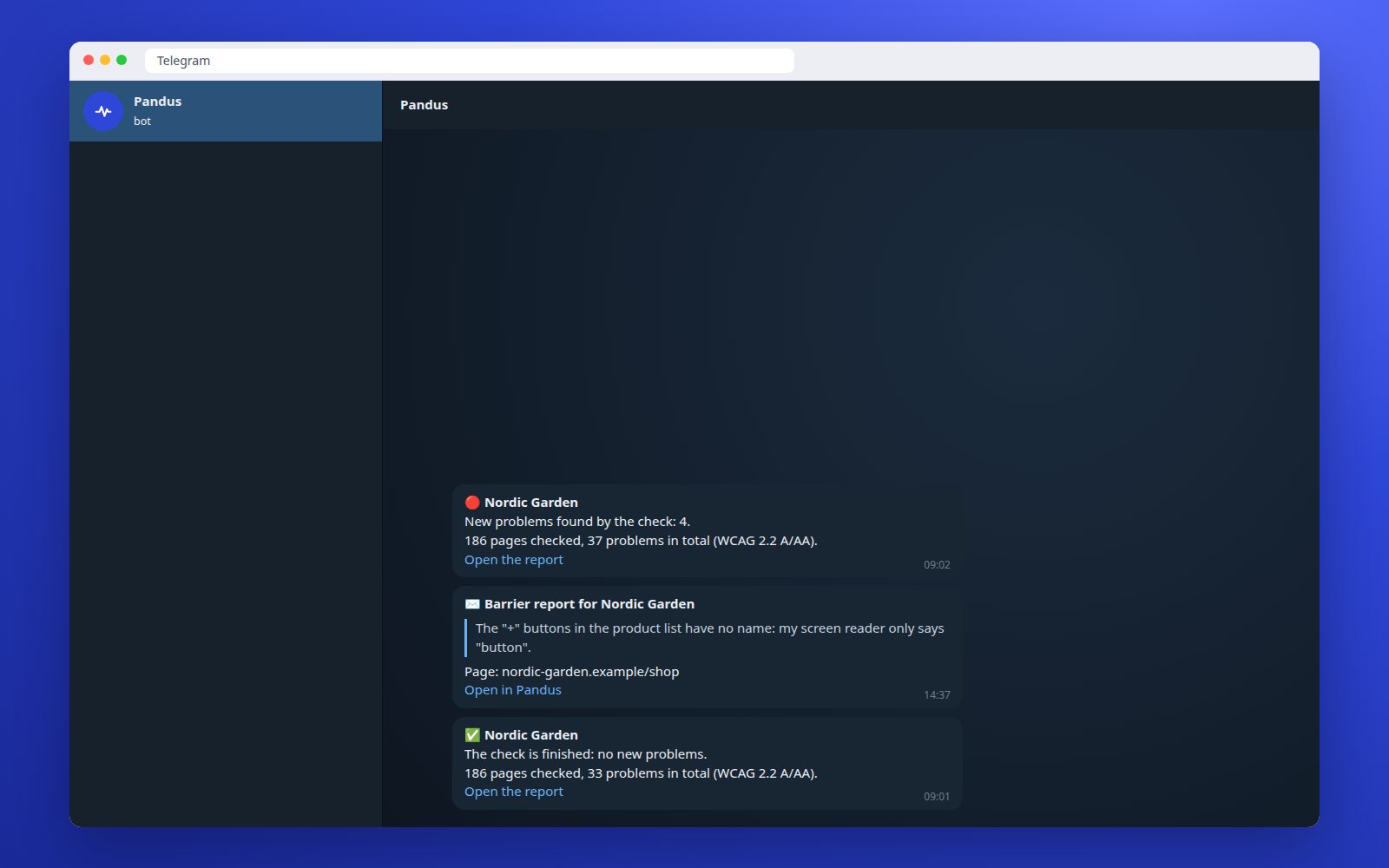
New problems, finished checks and barrier reports in a Telegram chat

See where real visitors get stuck: the Pandus SDK

See a full sample report: a fictional shop under a studio brand, as a page and a PDF

Step 1

Check whether the EAA applies to you

The law does not cover every website. If any answer is “no”, the EAA service requirements do not apply to you, and we will say so rather than sell you a report you do not need.

  • Do you sell to consumers (B2C)? The site sells goods or services to private individuals, not only to businesses.
  • Is your service in an EAA sector? E-commerce, banking services, e-books, passenger transport, electronic communications, access to audiovisual media services.
  • Are you not a micro-enterprise? A micro-enterprise has fewer than 10 employees and an annual turnover or balance sheet total of up to €2 million. A shop with 4 employees, €3 million turnover and a €0.4 million balance sheet is exempt.

This also applies to shops outside the EU, for example in Ukraine: if you sell to consumers in the EU, the EAA applies to you even if your company is registered elsewhere. And if it does not apply, accessibility is still worth the work: in our October 2026 check, 55% of large shop home pages had text with too little contrast and 23% blocked zoom on a phone. Those customers leave whether or not a law is watching.

Does the EAA apply to you?

Do you sell to consumers?
Is your service in an EAA sector?
10+ employees, or turnover and balance sheet above €2 million?

Answer the three questions to see the result.

This is guidance, not legal advice.

What 289 shop home pages got wrong

On 13 October 2026 we ran our check on the home pages of 289 well-known online shops in Germany, Poland, Czechia, Romania and Ukraine. The median page had 20 failing elements. Here is what we found, what it does to a customer, and where it usually sits in a shop theme.

Problem Home pages What a customer runs into Where it usually sits
Text with too little contrast 159 (55%) Grey prices and delivery terms that older customers and anyone outdoors cannot read; #999999 on white is 2.85:1, the minimum is 4.5:1 One colour variable in the theme
Icon links without a name 136 (47%) The cart, account and search icons a screen reader announces only as “link” The header the theme shipped with
Hidden button name differs from the visible text 108 (37%) A customer using voice control says “Search” and nothing happens Search and filter buttons with an aria-label in another language
Buttons and links under 24 pixels 90 (31%) Mis-taps on quantity plus and minus, colour swatches and close icons The product page and the cart
Buttons without a name 80 (28%) An “Add to cart” drawn as an icon that a screen reader cannot name; the purchase ends there Product tiles and the sticky cart bar
Images without a description 68 (24%) Banners and product photos that carry information nobody who cannot see them receives Hero banners and the gallery
Zoom blocked on mobile 66 (23%) A customer with low vision cannot enlarge the price or the checkout form on a phone One meta tag in the theme head

One page per shop, never the checkout, so these numbers understate the problem. By category, kids (median 70) and sport (71) scored lowest, fashion (83) and home (84) highest. 21 home pages passed every automated rule; one chain did so in four countries, with one template. The data is free to download: Accessibility of online shops 2026.

Step 2

See what the report shows

The report is written for the shop owner, not only for the developer, and it sorts by what stops an order, not by how many times a rule fails.

  • A one-page summary: how many critical problems, the three that matter most and what they mean for customers.
  • Priorities with reasons: first whatever blocks an order, the cart, the delivery form, payment. An unnamed “Add to cart” button is critical; forty grey footer links are serious, and they come later.
  • Instructions for your platform: Shopify, WooCommerce, PrestaShop, Shoptet. On another platform we name the HTML cause, which is the same.
  • Mapped to standards: WCAG 2.2 criteria and EN 301 549 clauses.
  • A developer appendix: element selectors and code examples.

How common each home-page error is: see the table above. In the checkout, which those numbers do not include, we also see form fields without labels and error messages that do not say which field is wrong. What to check by hand: the WCAG 2.2 checklist.

Step 3

Prepare the accessibility information

The EAA (Article 13 and Annex V of Directive 2019/882) requires you to describe how your service meets the accessibility requirements, in your terms and conditions or an equivalent document. In Germany this is usually a separate Barrierefreiheitserklärung page under §14 BFSG; in Poland it goes into the regulamin.

A scanner cannot write this text: it has to describe the service itself. So we prepare a draft from your questionnaire, and the scan results go only into the “known limitations and remediation plan” section. Have your lawyer review the draft. A missing statement is the easiest breach for anyone to find: it takes ten seconds in the footer.

Express report and weekly monitoring

Prices in your currency
  • Express report

    A one-off automated check of up to 20 pages of your shop, with a PDF in your country’s language. If you subscribe within 30 days, its cost is credited.

    Order an express report
  • Weekly monitoring

    We check your shop every week and let you know if new errors appear after a theme or plugin update. In our experience that is when fixed problems come back, and the weekly comparison is how you notice before a customer does.

What is happening with enforcement

There are no confirmed EAA fines for shops yet, and we do not use fines as an argument. Inspections are under way.

  • National market surveillance authorities are already checking online shops: in the second quarter of 2026 the Czech ČOI inspected 47 online shops and found violations in 10 of them.
  • Customers can complain to the authorities, and in Poland a shop must answer a consumer complaint within 30 days. Courts are already hearing accessibility cases.
  • In Germany there are also paid warning letters from lawyers (Abmahnung). A country-by-country overview is in the EAA guide.

Example scenarios

How teams use Pandus

  • Does the law apply?

    Three questions before anything else

    The owner of a small shop in Czechia answers the EAA filter: consumers, e-commerce, twelve employees. The law likely applies. The free check of a product page shows the main problems in Czech, with the Shoptet steps for each, and the statement generator gives a first draft of the accessibility page to show the lawyer.

    • No scare e-mails, a clear yes or no
    • A first draft of the statement in one afternoon
  • Checkout

    The step the scanner cannot see

    The owner adds a product to the cart, opens the checkout and clicks the Pandus icon in the browser. Two fields have no label, and the error message does not say which field is wrong. The developer gets the fixing steps for WooCommerce; with the SDK the shop later sees how many visitors still meet the problem.

    • The checkout checked behind the login
    • A fix confirmed by real visitors

We wrote these scenarios to show where Pandus fits into a working day. They are examples, not customer quotes: real reviews appear on this site only when a customer agrees to publish one.

Frequently asked questions

My shop sells in the EU, but we have 6 employees. Does the EAA apply to us?

If you have fewer than 10 employees and either your annual turnover or your balance sheet total is no more than €2 million, you are a micro-enterprise, and the EAA service requirements do not apply to you. Nobody should sell you compliance in that case.

Which page should I check first?

A product page. It carries the template most of your shop is built on, with the price, the gallery, the size picker and the “Add to cart” button, where the unnamed buttons and the small targets live. Then the checkout, with our browser extension, because the free check arrives with an empty cart.

What is the express report?

A one-off automated check of up to 20 pages of your shop, with a PDF report in your country’s language, priorities and references to EN 301 549. It is not a full audit, and its cost is credited if you subscribe within 30 days.

Is fixing the errors in the report enough to comply with the law?

No. An automated check finds only some of the problems. The report helps you fix the most common errors and track changes, but it does not replace a manual test of the purchase with a keyboard and a screen reader, or advice from a lawyer.

See what the check finds on your shop

One page, usually about a minute, no sign-up. Start with a product page: it carries the template the rest of your shop is built on.

We send the result with a PDF you can forward to your developer. Leave it empty to see the result only on this page. Privacy policy

One page, WCAG 2.2 AA, about a minute. Automated check, not a full audit. Not legal advice.