Skip to content
Pandus

Accessibility monitoring for web agencies, under your brand

Every week we check your EU clients’ sites and prepare accessibility reports in the client’s language, under your agency’s brand. Your PM hands the document to the shop owner, your developers get the problems in Jira, and nobody spends an evening translating axe output into German.

  • Your logo and colours
  • German, Polish, Czech, Romanian
  • An automated check, not an audit
Nova Studio WCAG 2.2 AA

Bericht zur Barrierefreiheit

shop.baeckerei-krume.de

3 Kritisch

8 Schwer

12 Mittel

4 Gering

Agency brand and report language

5.9 : 1 ✓

How it looks

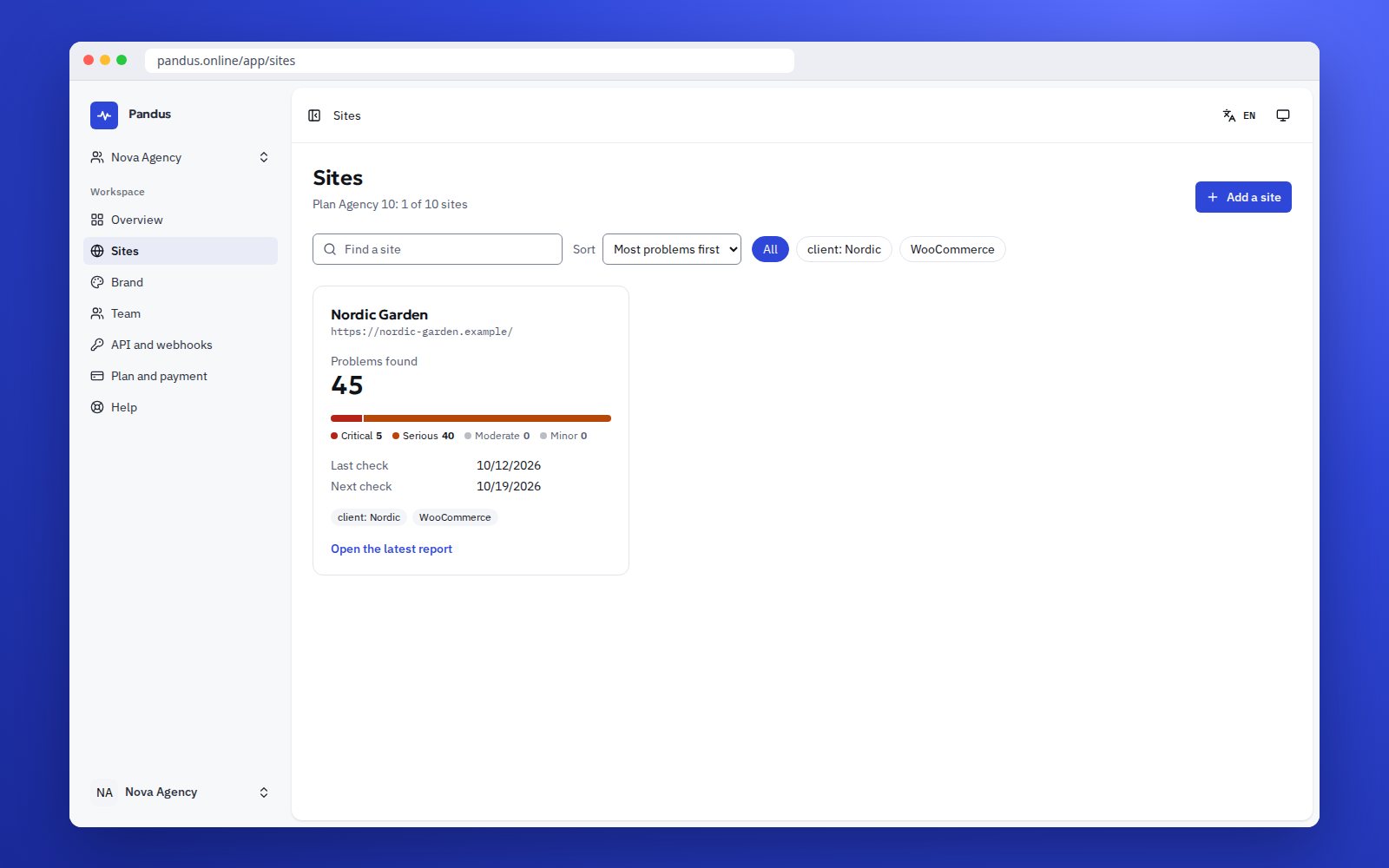
All client sites in one list with problems, trends and tags
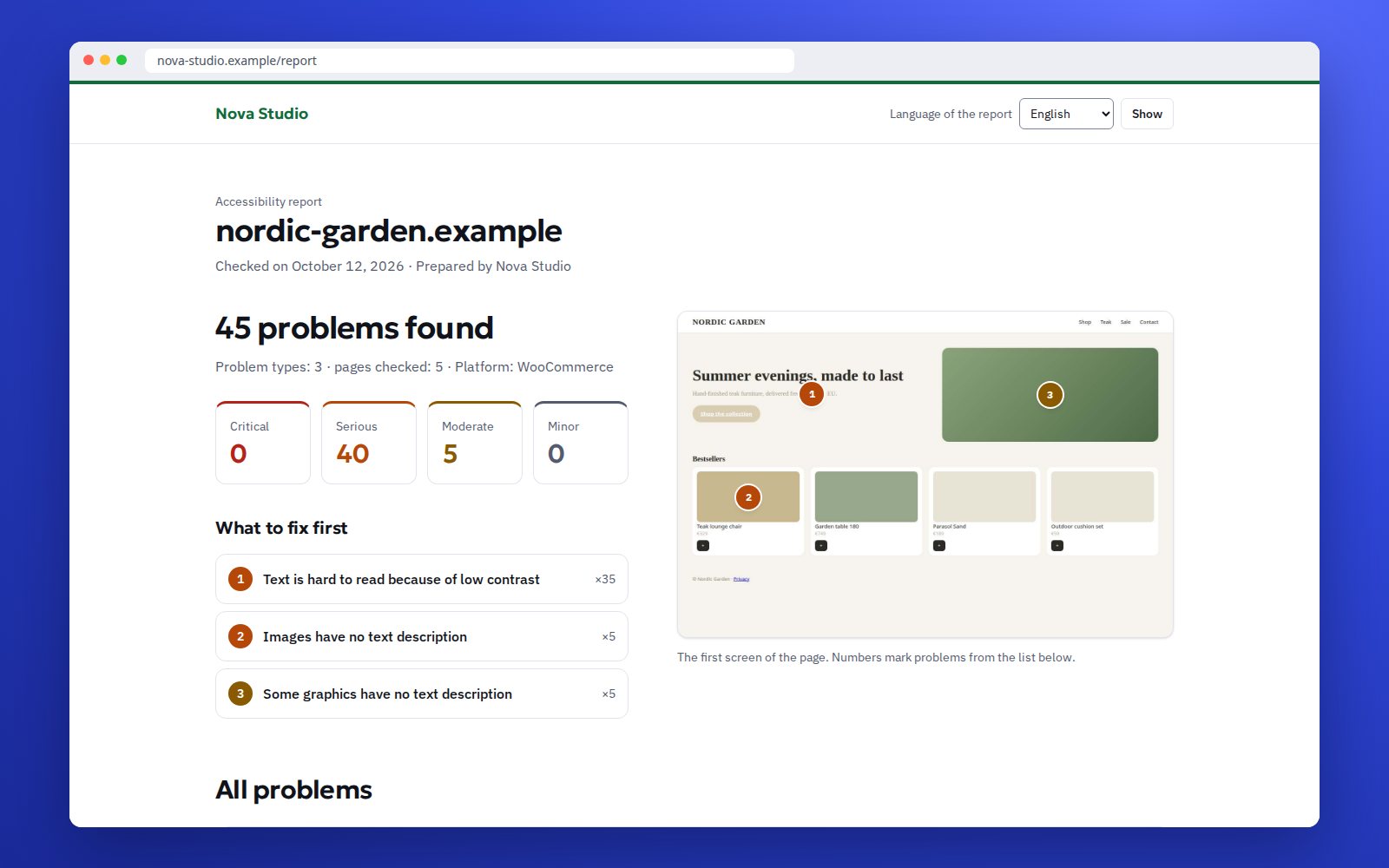
The report for the client under the agency brand, in the client's language
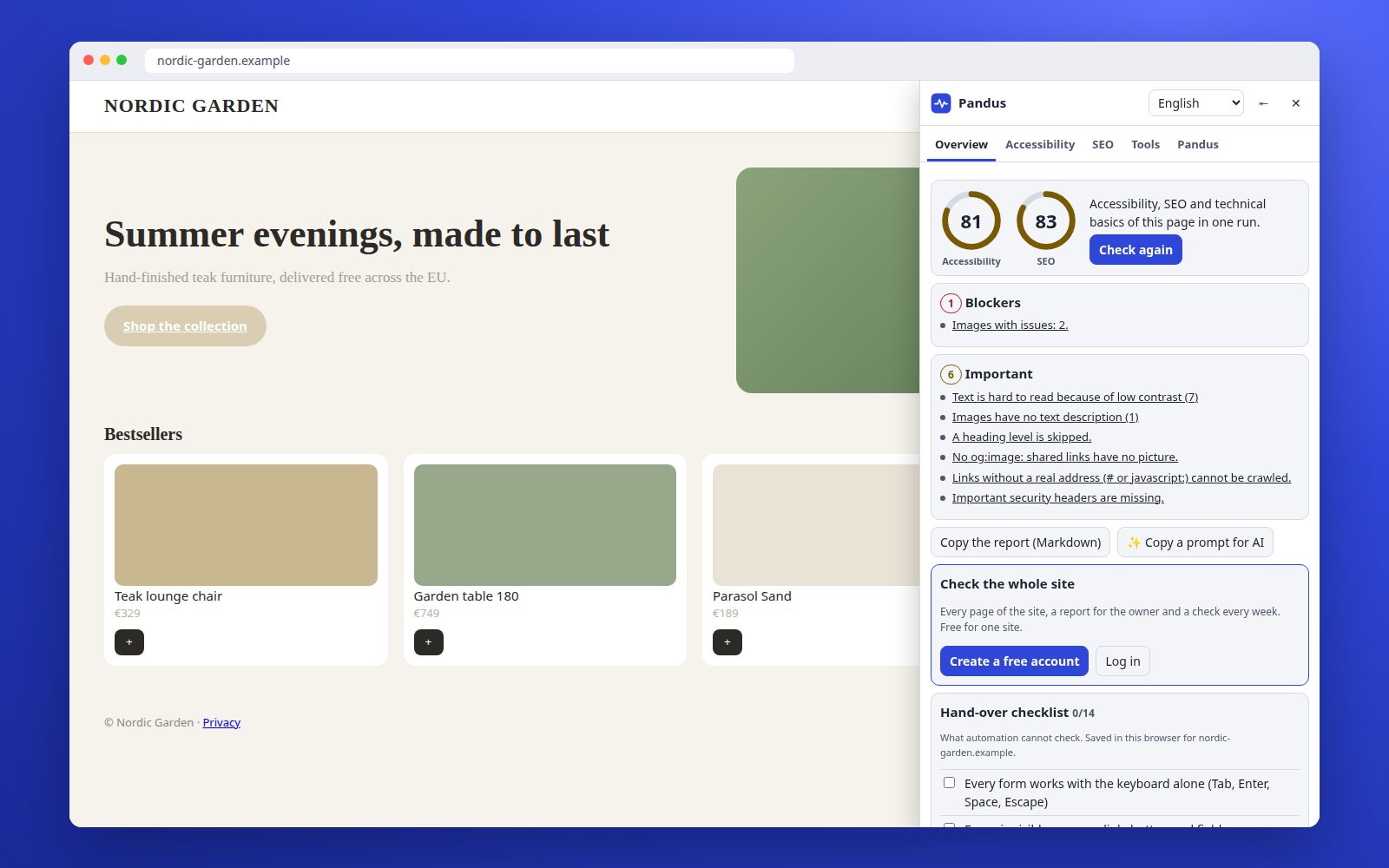
The extension overview: accessibility and SEO scores, blockers and the hand-over checklist
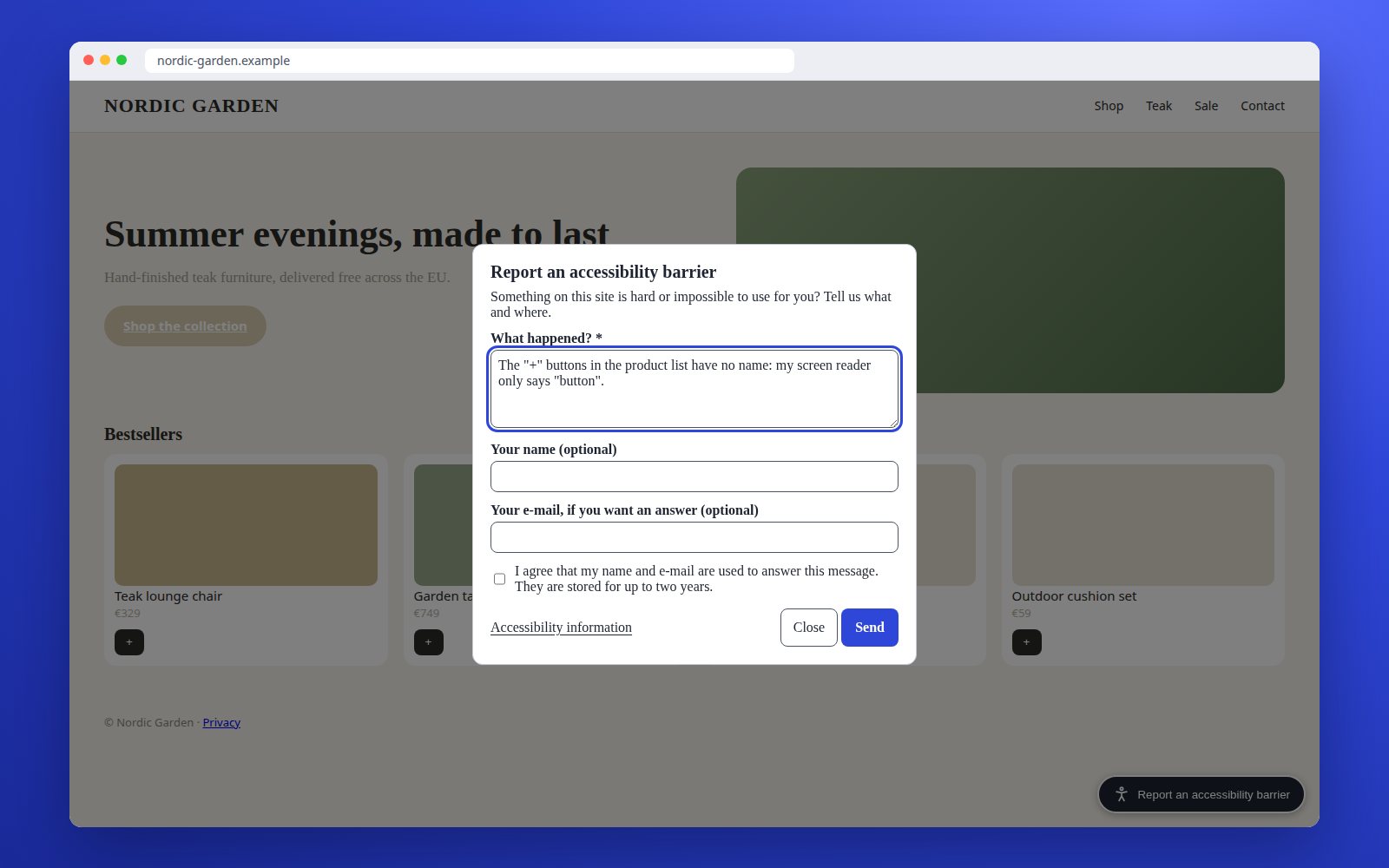
The "Report a barrier" form on a shop, opened from the button in the corner

See where real visitors get stuck: the Pandus SDK

See a full sample report: a fictional shop under a studio brand, as a page and a PDF

Who it is for

It helps most for agencies of 5–25 people that:

  • build and maintain websites and online shops for clients in the EU;
  • do not have a dedicated accessibility specialist;
  • hear clients ask about the European Accessibility Act or BFSG and need to give a clear answer quickly, including “no, this does not apply to you”.

If your team already runs axe-core in CI and writes client reports in German without effort, you probably do not need us. That is a fair answer, and we would rather give it than sell you a second scanner.

What your clients’ sites probably look like

On 13 October 2026 we ran our check on the home pages of 289 well-known online shops in Germany, Poland, Czechia, Romania and Ukraine. The problems an agency inherits with a theme are the same everywhere.

  • 54% of 289 shop home pages had a link or button without a name, usually the cart, search or account icon in the header the theme shipped with

    Source: Pandus study, October 2026

  • 48% of German home pages had a button whose hidden name differs from its visible text, for example a “Suchen” button whose aria-label says “search”; the most common failure in Germany

    Source: Pandus study, October 2026

  • 4 of 5 countries where the same furniture chain’s home page passed every automated rule; the fifth missed by one unnamed link. One template, maintained once

    Source: Pandus study, October 2026

A beauty retailer scored exactly 43 in all five countries with the identical list of failures, and a drugstore chain scored 100, 94 and 71 on three local sites. The template decides, and the team that maintains it, which is good news for an agency: a fix in the product template reaches every product page of every client on it. The study, with data free to download: Accessibility of online shops 2026.

What your agency gets

Everything you need to make the accessibility report part of project handover, not a separate manual task.

  • White-label report

    Your agency’s logo and colours, your name in the e-mails. Before saving, we check the contrast of your colours so the report itself stays accessible: white on a brand blue like #2f47d9 passes at 6.9:1, white on an orange like #ff9800 fails at 2.2:1, and we tell you.

  • Report in the client’s language

    German, Polish, Czech, Romanian, English or Ukrainian. If a card translation is still machine-made and not yet reviewed by a native speaker, the report marks it, so you are never surprised in front of a client.

  • Explanations for the business, with reasons

    For each rule: the WCAG 2.2 and EN 301 549 clause, what it means for shoppers, how serious it is and why. An unnamed “Add to cart” button is critical; an unnamed footer icon is serious. Fixing notes for Shopify, WooCommerce, PrestaShop and Shoptet.

  • All sites in one account

    Tags per client, the trend in the number of problems and a weekly check. If new problems appear after a release, you hear about it before the client does.

  • EAA filter for each client

    Not every site falls under the EAA: the law covers B2C services in specific sectors and does not apply to micro-enterprises. The filter helps you avoid alarming a client the law does not cover, which is the fastest way we know to lose their trust.

    Who the EAA applies to
  • Accessibility information draft

    From a client questionnaire, the service prepares a draft of the “accessibility information” in the language of the client’s country. A scanner cannot write this document, because it describes the service; the client reviews the draft with their lawyer.

    What the document should contain

Deliverables for your clients

What you hand over after a check: the problems in the tools your team already uses, proof that the fixes worked and, on Agency plans, a draft conformance report.

  • Problems in your team’s tracker

    On a finished check, export the problems as CSV or JSON, as GitHub issues (Markdown, one issue per rule) or as a Jira import file. Available on every paid plan.

  • Comparison of two checks

    Pick any two checks of a site and see, for each rule, what was fixed, what is new and what is still open. A ready “before / after” for the client, and the answer to “what did we pay you for this month”. Available on every plan.

  • ACR draft (Agency plans)

    A draft Accessibility Conformance Report in the VPAT format, with all 55 WCAG 2.2 A and AA criteria and the automated result for each: failures found, no automated failures, or not testable automatically. We never write “Supports” on our own; a person sets the conformance level and the remarks. It is a draft, not a finished ACR, and not legal advice.

What the workflow looks like

This is how the report becomes part of project handover and a reason for further work with the client.

  1. 1

    You add client sites

    In your account, or send us a list during the pilot.

  2. 2

    You set up your brand

    Logo, colours and report language for each client.

  3. 3

    The service checks the sites weekly

    And builds “before / after” reports.

  4. 4

    Your PM hands the report to the client

    Together with a proposal for fixes that your agency carries out.

  5. 5

    After the fixes

    The next check shows which problems are gone, and the client sees it in their own language.

How this differs from free tools

Lighthouse and Unlighthouse run the same axe-core engine we do; Pa11y uses HTML_CodeSniffer by default. On shared rules the findings agree. The difference is what the client receives and who maintains the tool.

Pandus Lighthouse, Unlighthouse, Pa11y CI
Scanning Yes Yes
Report for the business owner with explanations, priorities and the reasons technical output
EU languages 7 languages, including de, pl, cs, ro the developer’s tool language, no client report
White-label built in you build it yourself
Tool maintenance on us on your team

A pilot for the first month

Try the reports on real client sites for one month at a reduced price, by invoice, before you decide.

Pilot for agencies: the first month at a reduced price. Ask about a pilot

Partner programme

  • Partner programme

    If you bring clients who subscribe directly, you receive a commission.

    Programme terms

What we do not promise

Honesty is part of the product. It says so on every page of the report, under your brand too.

  • We do not promise full legal compliance: automated testing finds only part of the problems. Studies disagree on how large a part; none says all of it.
  • We do not install overlay widgets on client sites. More on why overlays do not work.
  • Manual testing is not included in the subscription. It can be ordered separately.
  • We do not tell a client the law applies to them when it does not. The filter runs first.

Example scenarios

How teams use Pandus

  • Pre-launch QA

    The last check before the hand-over

    The QA engineer runs the extension on the staging site: the overview shows the blockers, the SEO tab finds the noindex left from development, and the hand-over checklist covers what automation cannot see, such as a checkout that works with a keyboard. The cart button without a name goes to Jira with “Copy for the developer”. On Friday the client in Munich gets the first weekly report in German, under the agency brand.

    • One run instead of four extensions
    • The client never sees the staging leftovers
  • Monthly retainer

    A report the client actually reads

    Pandus checks every client site weekly and keeps the history. At the end of the month the account manager opens the client link: what was fixed, what is new, in the client’s language and under the agency brand. For clients with the SDK the report also shows how many real visitors still hit the remaining problems. When the client asks “are we compliant now?”, the answer is on the page: here is what we found, here is what we fixed, here is what a person still has to test.

    • Accessibility becomes a line in the monthly report
    • An argument for the next sprint, with numbers

We wrote these scenarios to show where Pandus fits into a working day. They are examples, not customer quotes: real reviews appear on this site only when a customer agrees to publish one.

Frequently asked questions

Why pay when Unlighthouse and Pa11y are free?

Lighthouse and Unlighthouse run the same axe-core engine we do, and Pa11y uses HTML_CodeSniffer by default; on the rules they share, the findings agree. You pay for the part after the scan: a report the client can read in their own language, the reasons behind each priority, your brand on it, and nobody in your team maintaining the tool or translating the output.

My client asks whether they are compliant now. What do I answer?

That an automated check cannot say so, and that nobody honest can without a manual test of the purchase with a keyboard and a screen reader. The report gives you what you can show instead: every problem found, what was fixed since the last check, and the draft accessibility information.

Can I present the report to a client as an audit?

No. The report is an automated check, not a full audit, and not legal advice. It says so on every page of the report, under your brand too.

What is the pilot?

The pilot is the first month of the Agency plan at a reduced price, paid by invoice, without a card. You add client sites, receive reports under your brand and then decide whether to continue; there is nothing to cancel. Request it with the button on this page.

Can I send the problems straight to the developers?

Yes. On a paid plan, export a check as CSV or JSON, as GitHub issues (Markdown, one issue per rule) or as a Jira import CSV, so the list goes into the tracker your team already uses.

Is the ACR draft a VPAT?

No. It is a draft built from the automated check on Agency plans. It never marks a criterion “Supports” automatically; what automation cannot test is “Not evaluated”. It becomes an ACR only after a person has evaluated every criterion. It is not legal advice either.

Try the reports on your clients’ sites

Tell us how many sites you maintain, and we will propose a pilot for the first month.