Skip to content
Pandus

Accessibility checks that business owners understand

Every week Pandus opens every page of your site in a real browser, runs the WCAG 2.2 AA checks and writes down in plain words what stops a customer: the cart button a screen reader can only call “button”, the grey #999999 price at 2.85:1 contrast that a customer with low vision cannot read. Then it tells you which three things to fix first.

We send the result with a PDF you can forward to your developer. Leave it empty to see the result only on this page. Privacy policy

One page, WCAG 2.2 AA, about a minute. Automated check, not a full audit. Not legal advice.

  • Every page, every week, against WCAG 2.2 AA
  • Each problem explained in plain words, with what to fix first
  • Reports in seven languages, including German and Polish
  • Servers and data in the EU
Trail 2 €129
Critical

The cart button has no name A shopper using a screen reader only hears “button” and cannot tell that it adds the product to the cart.

How to fix it in Shopify

In the product template, give the icon button the text “Add to cart”, visible or as an aria-label.

button-nameWCAG 4.1.2EN 301 549 9.4.1.2

What a found error looks like in the report: in plain words, in your client's language.

Automated check against the WCAG 2.2 AA criteria

WCAG is the basis of:
  • EN 301 549
  • DSTU EN 301 549:2022 (UA)
  • EAA (EU) 2019/882
  • BFSG
  • ADA
  • Section 508

Automated checks find part of the problems. This is not a full audit and does not confirm legal compliance. Free WCAG checker: test one page against each criterion →

Pandus SDK

Two parts: a scanner and a live SDK

The scanner finds problems on every page. The SDK shows which ones real visitors run into and how often, so you fix what costs you customers first.

  • Live barriers in the cart, checkout and account
  • One list of what to fix first, ranked by real traffic
  • Analytics, heatmaps and masked recordings, only after consent
  • Not an overlay: nothing on your site changes

Pandus in under a minute

A video with voice-over; the sound is off until you turn it on. Add a site, Pandus checks every page every week, the owner gets a report in their language, agencies send it under their brand; the browser extension, the barrier form and Telegram alerts.

How it looks

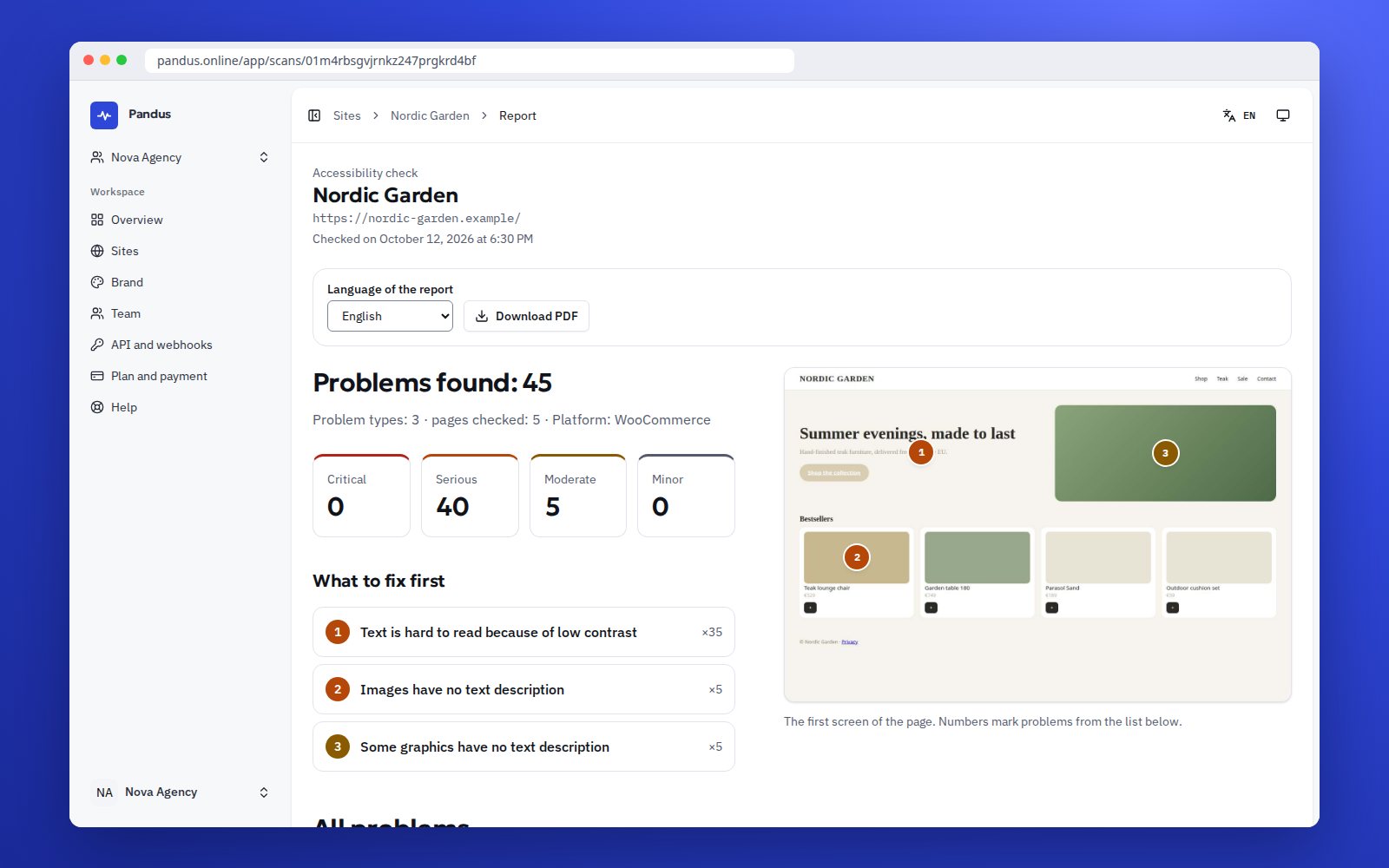
The report for the owner: what to fix first, with a screenshot of the page
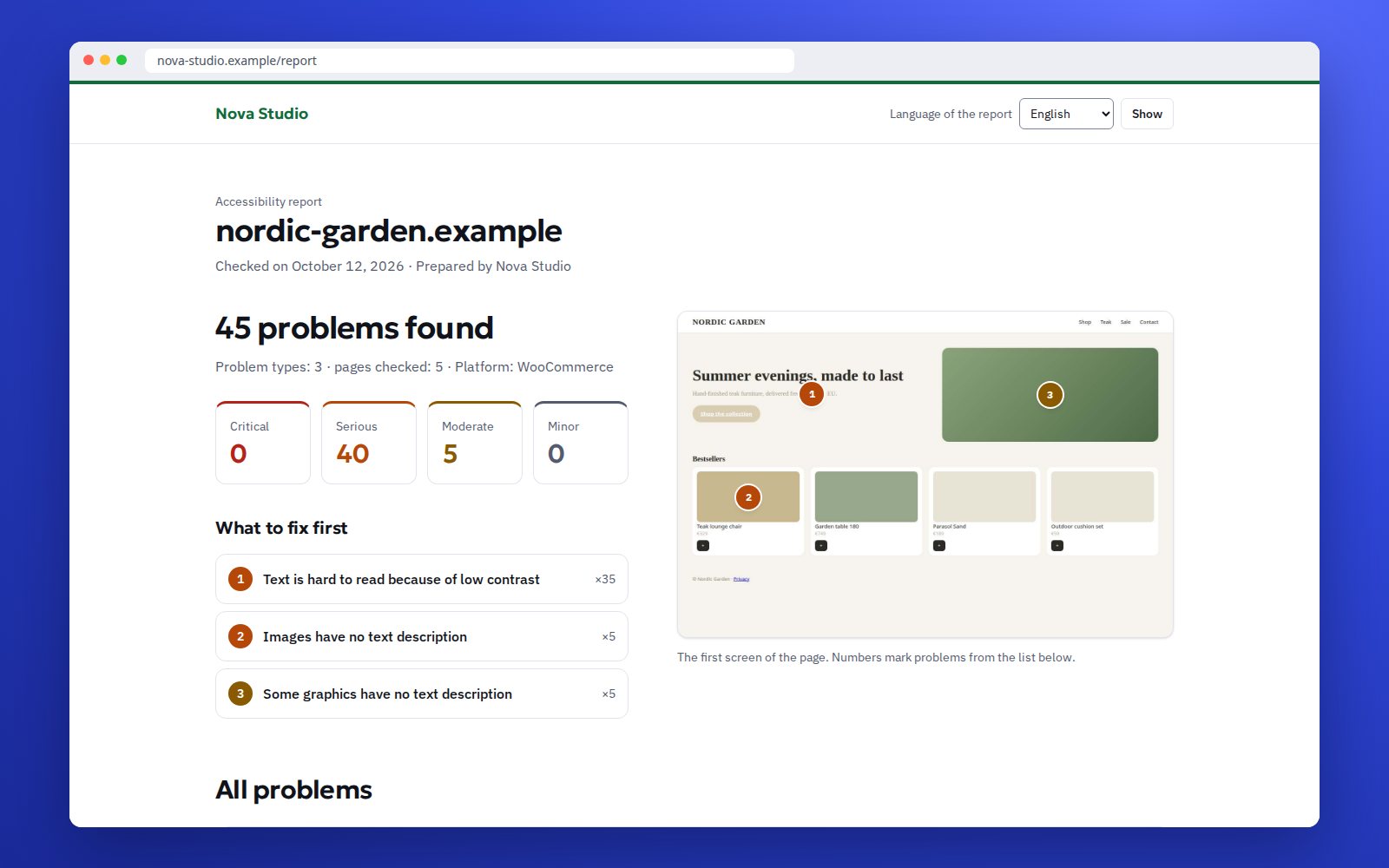
The report for the client under the agency brand, in the client's language
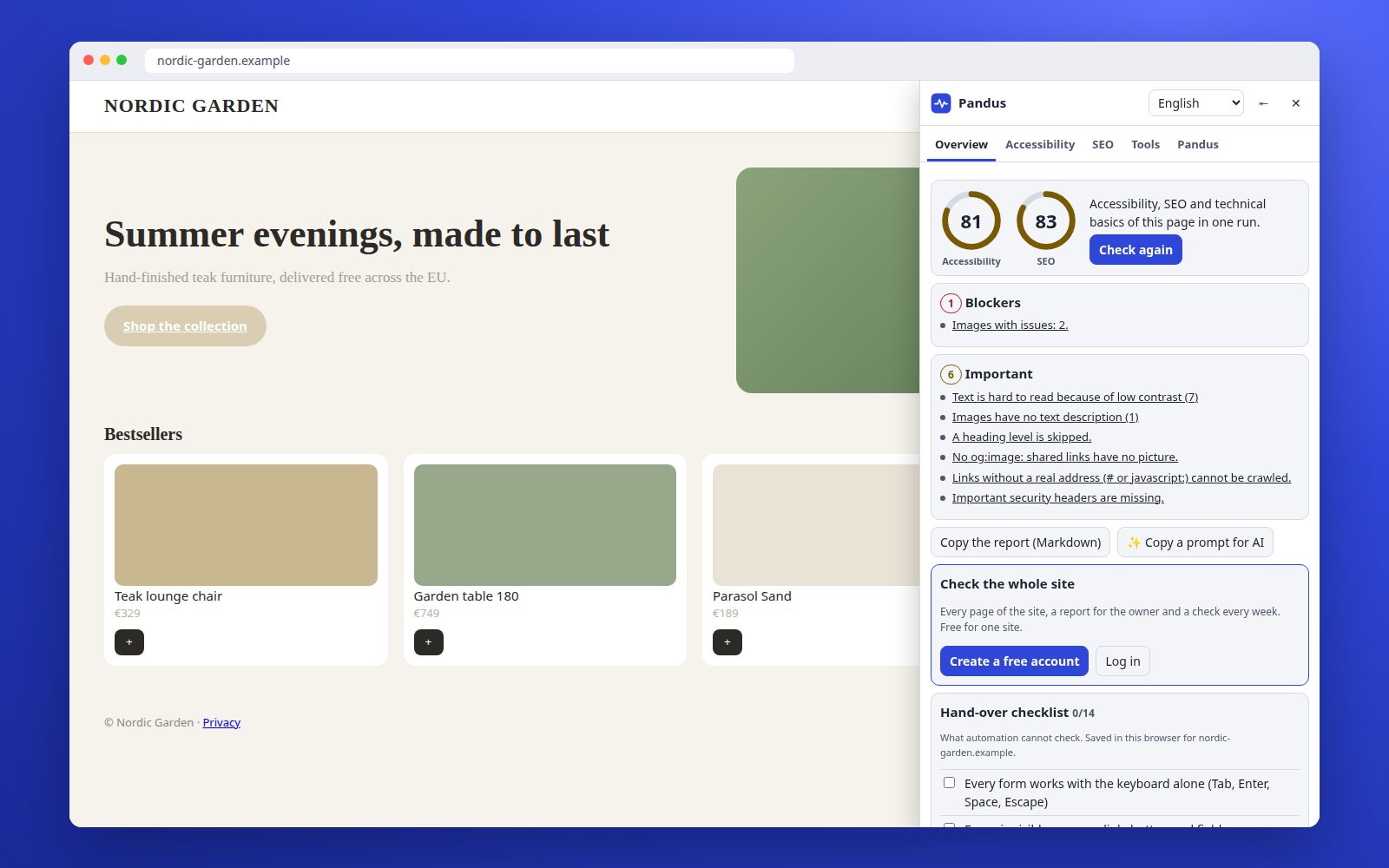
The extension overview: accessibility and SEO scores, blockers and the hand-over checklist

See where real visitors get stuck: the Pandus SDK

See a full sample report: a fictional shop under a studio brand, as a page and a PDF Our study: how accessible are online shops in Europe

What we see when we check shops

In October 2026 we ran our check on the home pages of 289 well-known online shops in five countries. The problems are not exotic, and they repeat from shop to shop.

  • 55% of 289 shop home pages had text with too little contrast, often grey text on white; 54% had a link or button without a name

    Source: Pandus study, October 2026

  • 10 of 47 online shops had accessibility violations in checks by the Czech inspectorate ČOI in Q2 2026

    Source: ČOI, August 2026

  • 5,000+ website accessibility lawsuits were filed in the US in 2025, about 70% of them against online shops

    Source: UsableNet, 2025 report

There are no confirmed EAA fines for shops yet, and we do not use fines as an argument. One chain scored 100 in four countries, another 43 in five, a third 100, 94 and 71 on three local sites: the template and the team that maintains it decide, and both can be fixed. Our study, with the data free to download: Accessibility of online shops 2026.

How it works

More about the process
  1. 1

    Enter your site address

    Start with a free check of one page, best a product page. No sign-up, usually about a minute.

  2. 2

    Get the report

    The first page has a summary and the three most important problems. Then come the steps for your platform and an appendix for your developer.

  3. 3

    Track changes

    The weekly check compares before and after and tells you when a theme or app update brings a problem back.

Each problem is a separate card you can understand without a developer

The report is built automatically from a library of rule cards. Each card answers the owner’s questions and says why we rate the problem the way we do; the technical details are in the appendix.

  1. 1

    What is wrong

    The problem in plain words and how many times it appears on the site.

  2. 2

    How serious it is

    Critical, serious, moderate or minor, with the reason. An unnamed “Add to cart” button is critical; an unnamed footer icon is serious.

  3. 3

    Who it affects

    Which shoppers run into the problem and how it stops them from buying.

  4. 4

    How to fix it

    Steps for Shopify, WooCommerce, PrestaShop or Shoptet; the HTML cause for any other platform.

  5. 5

    Standard and developer details

    The WCAG 2.2 and EN 301 549 criterion, the element selector and a code snippet.

Who it is for

Web agencies with EU clients

Clients in Germany or Poland ask about the EAA, and nobody has time to write reports in their language. We check their sites every week and prepare reports under your brand, with an honest answer to “are we compliant now?”.

  • Your logo and colours in the report
  • Reports in your client’s language
  • From 10 sites in one account

Online shops and online services

First find out whether the law applies to you. If it does, the report shows what to fix first; if it does not, nobody should sell you compliance.

The EAA applies to you if the answer to all three questions is “yes”

  1. 1 Do you sell to consumers, not only to businesses?
  2. 2 Is your service on the EAA list, for example e-commerce?
  3. 3 Do you have 10 or more employees, or both annual turnover and balance sheet total above €2 million?

Company websites, SaaS and online services

Most sites are neither shops nor agency projects. The scanner checks every public page each week, and the SDK shows where signed-in users get stuck: in a dialog, a date picker, a table that only works with a mouse.

  • Checks behind the login with the SDK and the extension
  • A draft ACR in VPAT format for buyers and tenders
  • We say which rules apply to you, and when none does

We also work with Ukrainian companies selling in the EU and with contractors for government websites (ДСТУ EN 301 549:2022). Contact us

Example scenarios

How teams use Pandus

Three working days with Pandus, from a pre-launch check to a fix confirmed by real visitors.

  • Web agency · pre-launch QA

    A shop goes live on Friday

    On Thursday the QA engineer opens the staging site and runs the Pandus extension on the home page, a product page and the checkout. The blockers go to Jira with “Copy for the developer”: a cart button without a name, a form error nobody can hear, a noindex left from development. The project manager ticks the hand-over checklist, and the client in Germany gets the first weekly report in German, under the agency brand.

    • Launch without a surprise e-mail from the client about the checkout
    • A report the client can read without the developer
  • Online shop · the owner

    Where do customers get stuck?

    The weekly check shows 14 problems, and the owner does not know which one matters. The SDK does: in seven days 29 visitors hit a keyboard trap on the checkout page, about 3% of the sessions there. The developer fixes the focus in the theme, the scanner checks again, and a week later the problem is marked “confirmed by real visitors”.

    • The first fix is the one that cost orders
    • The fix is confirmed by traffic, not by hope
  • Ukrainian studio · Polish clients

    A monthly retainer with a report in Polish

    The studio maintains eleven shops for clients in Poland. Every Monday Pandus checks all of them and shows what is new since the last check; the developer exports the new problems to Jira. At the end of the month each client gets a report in Polish under the studio brand: what was fixed and what is still open. The EAA filter says beforehand which clients the law applies to, so nobody is scared for nothing.

    • One hour on Monday instead of eleven manual checks
    • A reason to talk to every client each month

We wrote these scenarios to show where Pandus fits into a working day. They are examples, not customer quotes: real reviews appear on this site only when a customer agrees to publish one.

What our customers say

  • Rating: 5 out of 5

    “A very pleasant and fast service. I loved everything!”

    Vadym Senior Developer, nooria-swiss.com
  • Rating: 5 out of 5

    “The service is amazing! Thanks to the developers, I was able to fix issues on my website using this service.”

    Zurab Shyvarbidze Full-stack Developer, shyvarbidze.pro

An honest look at what automated checks can do

Automated tools find only some of the problems, and studies disagree on how many (GOV.UK test, Deque study). That is why we do not promise “full compliance”, but offer regular monitoring, clear priorities and the reasons behind them.

Pandus Overlay widget Manual audit
Finds the cause in the site’s code Yes No Yes
Tells the owner what to fix first Yes No Partly
Checks the site every week Yes No No
Tests keyboard use, content and checkout flows No No Yes
Often marketed as a “one-line” fix No Yes No

In 2025 the FTC ordered accessiBe to pay $1 million over claims that its widget makes sites WCAG-compliant (FTC). Why overlays do not work

Pricing

Monthly subscription with no long contract and a 14-day refund. Pay by card or by invoice in hryvnia or euro.

All plans
  • Express report

    First order discount

    Old price: $19 New price: $13 one-off · incl. taxes

    • 1 site
    • up to 20 pages per check
    • one-off check
    • report for the business owner, with fixing instructions
    • comparison of any two checks
    • export of issues to CSV, JSON, GitHub and Jira
    Order a report: Express report
  • Pro

    First order discount · first payment only

    Old price: $49 New price: $34 per month · incl. taxes

    then $49 per month

    • 1 site
    • all pages of the site
    • checked every week
    • report for the business owner, with fixing instructions
    • e-mail when new problems appear
    • history of checks for 24 months
    • reports under your brand (white-label)
    • comparison of any two checks
    • export of issues to CSV, JSON, GitHub and Jira
    • ACR draft from the automated check
    • API and MCP server for AI assistants
    • SDK: live barriers, analytics, heatmaps and recordings
    • 3 team members
    Get started: Pro
  • Agency 10

    First order discount · first payment only

    Old price: $99 New price: $69 per month · incl. taxes

    then $99 per month

    • 10 sites
    • all pages of the site
    • checked every week
    • report for the business owner, with fixing instructions
    • e-mail when new problems appear
    • history of checks for 24 months
    • reports under your brand (white-label)
    • comparison of any two checks
    • export of issues to CSV, JSON, GitHub and Jira
    • ACR draft from the automated check
    • API and MCP server for AI assistants
    • SDK: live barriers, analytics, heatmaps and recordings
    • 5 team members
    Get started: Agency 10

Frequently asked questions

All answers
Is this a full accessibility audit?

No. It is an automated check, not a full audit and not legal advice. It finds the problems a machine can detect reliably; the rest, such as whether an order can be completed with a keyboard, needs a person.

Why does a free tool give my page 100 and you still find problems?

Most free tools run a subset of the axe-core rules and leave out what the engine cannot decide on its own, so a page can show 100 and still have problems. We run more rules, including the WCAG 2.2 target size the engine keeps switched off by default, and list every failed rule with how often it occurs instead of one score.

Does the European Accessibility Act apply to my website?

Not necessarily. It covers specific consumer services, such as e-commerce, and it exempts micro-enterprises that provide services. Our three-question filter gives you the answer in a minute, and we never sell “compliance” to a site the law does not cover.

Do you sell an accessibility overlay or widget?

No. We do not add a widget to your site or promise a “one-line fix”. We find the problems in your code and content and explain how to fix them in your platform’s theme.

In which languages are reports available?

English, Ukrainian, German, Polish, Czech, Romanian and Russian. Agencies can issue reports under their own brand, in the language of each client.

Do you need access to my site’s admin panel?

No. We check pages the same way a visitor sees them in a browser. There is nothing to install; the checkout and pages behind a login are checked with our free browser extension.

See what the check finds on your site

One page, usually about a minute, no sign-up. You see the three most important problems first, then every problem found on the page, with explanations and the reason behind each priority.

We send the result with a PDF you can forward to your developer. Leave it empty to see the result only on this page. Privacy policy

One page, WCAG 2.2 AA, about a minute. Automated check, not a full audit. Not legal advice.