Scanners only see public pages. The SDK shows where your real visitors get stuck.
Cart, checkout, customer account, screens behind a login: a scanner never gets there. Add the SDK with one line and the problem spots show up in your Pandus dashboard: which page, which element, how many visitors ran into it. Test accessibility on live traffic, not guesswork.
- One line of code, about 5 KB
- Nothing is sent before consent
- Data in the UK and the EU
How it looks
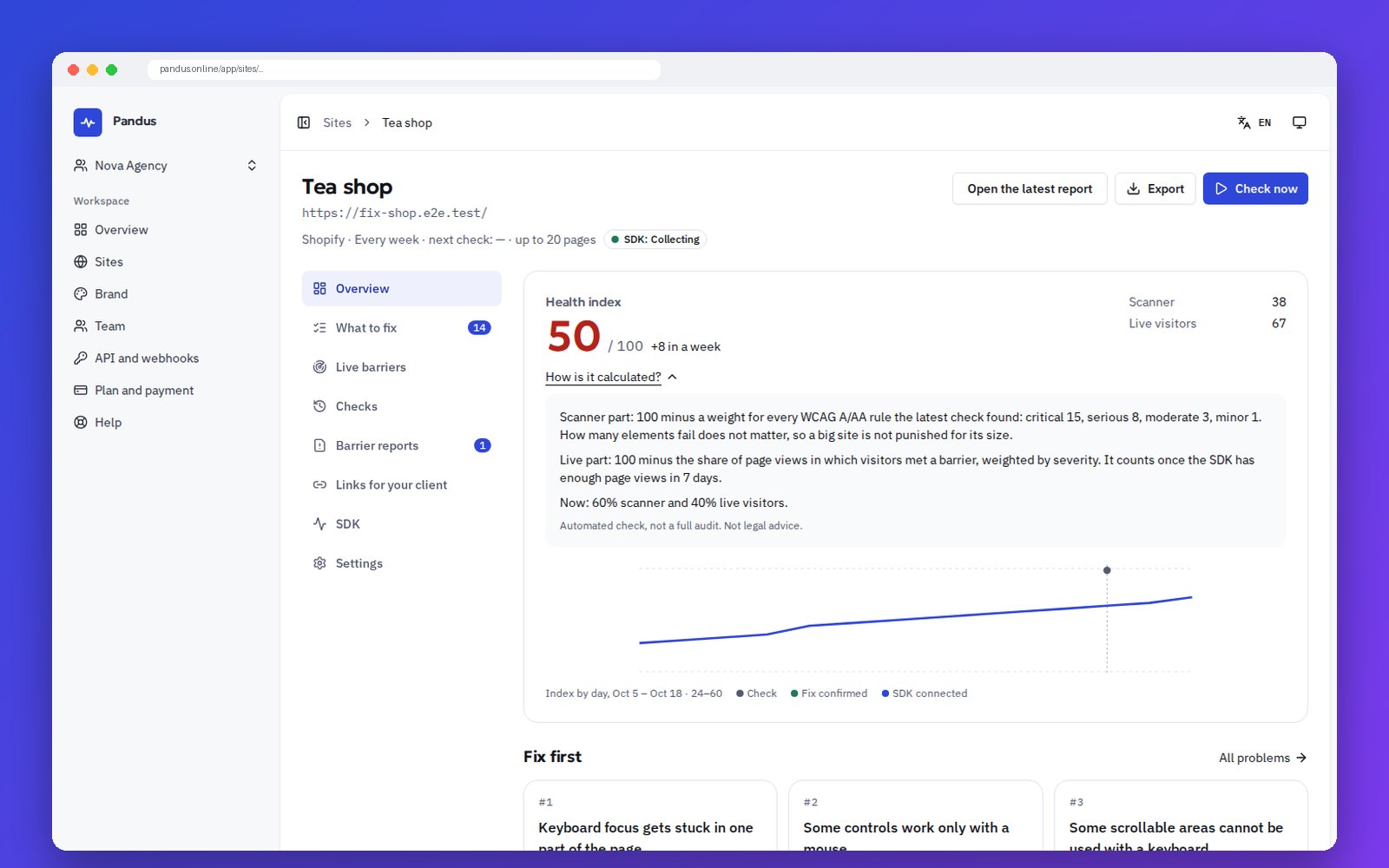
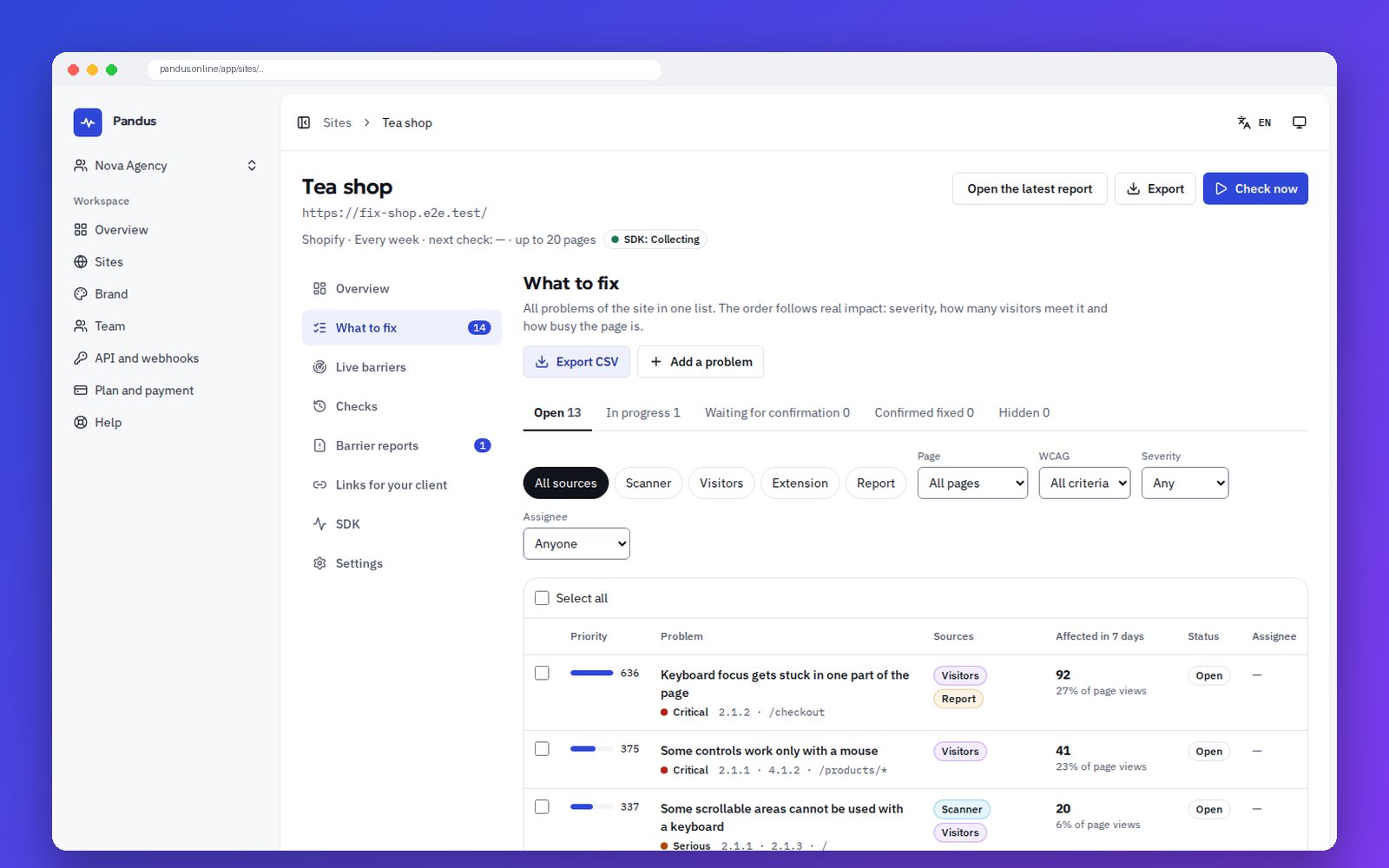
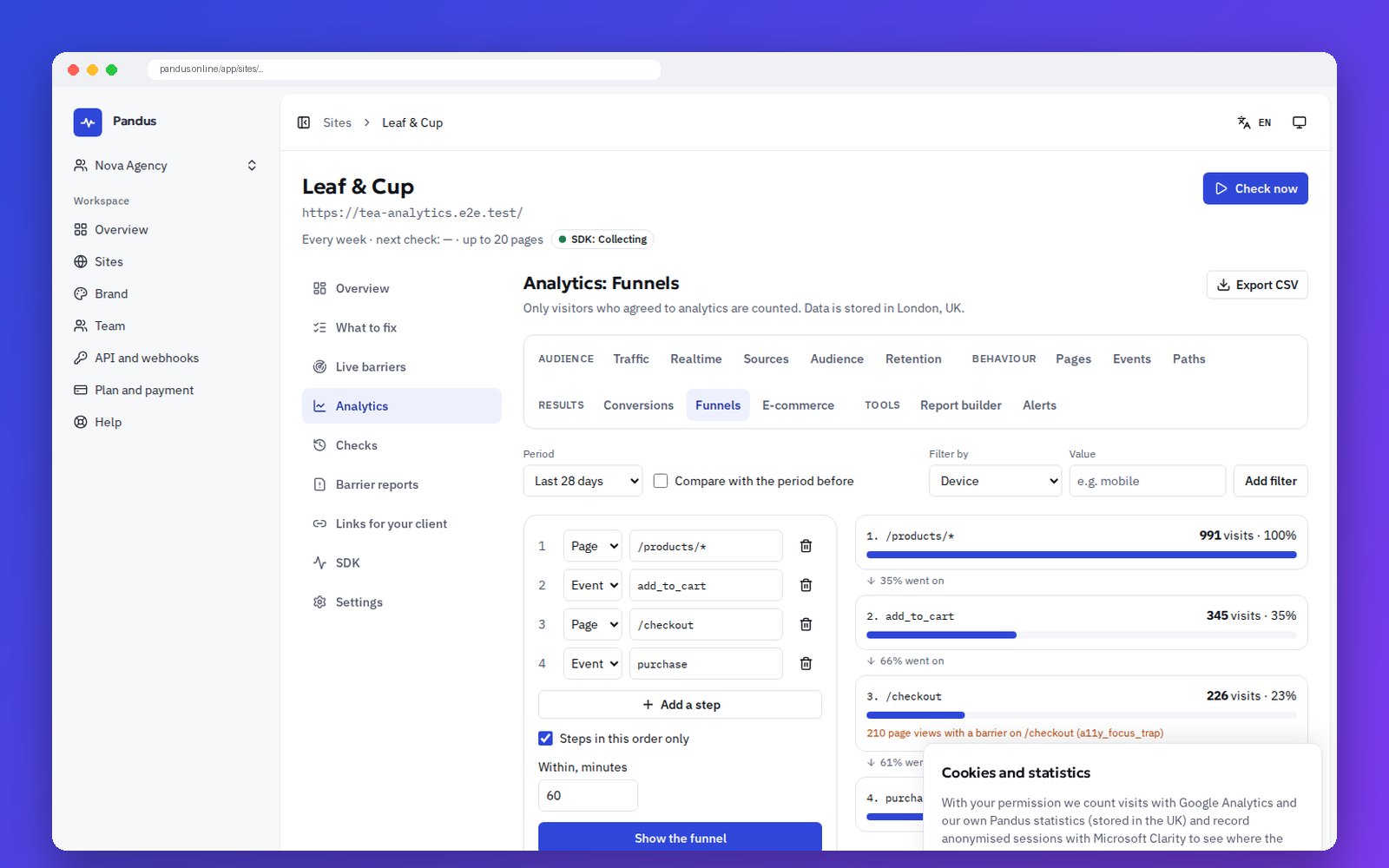
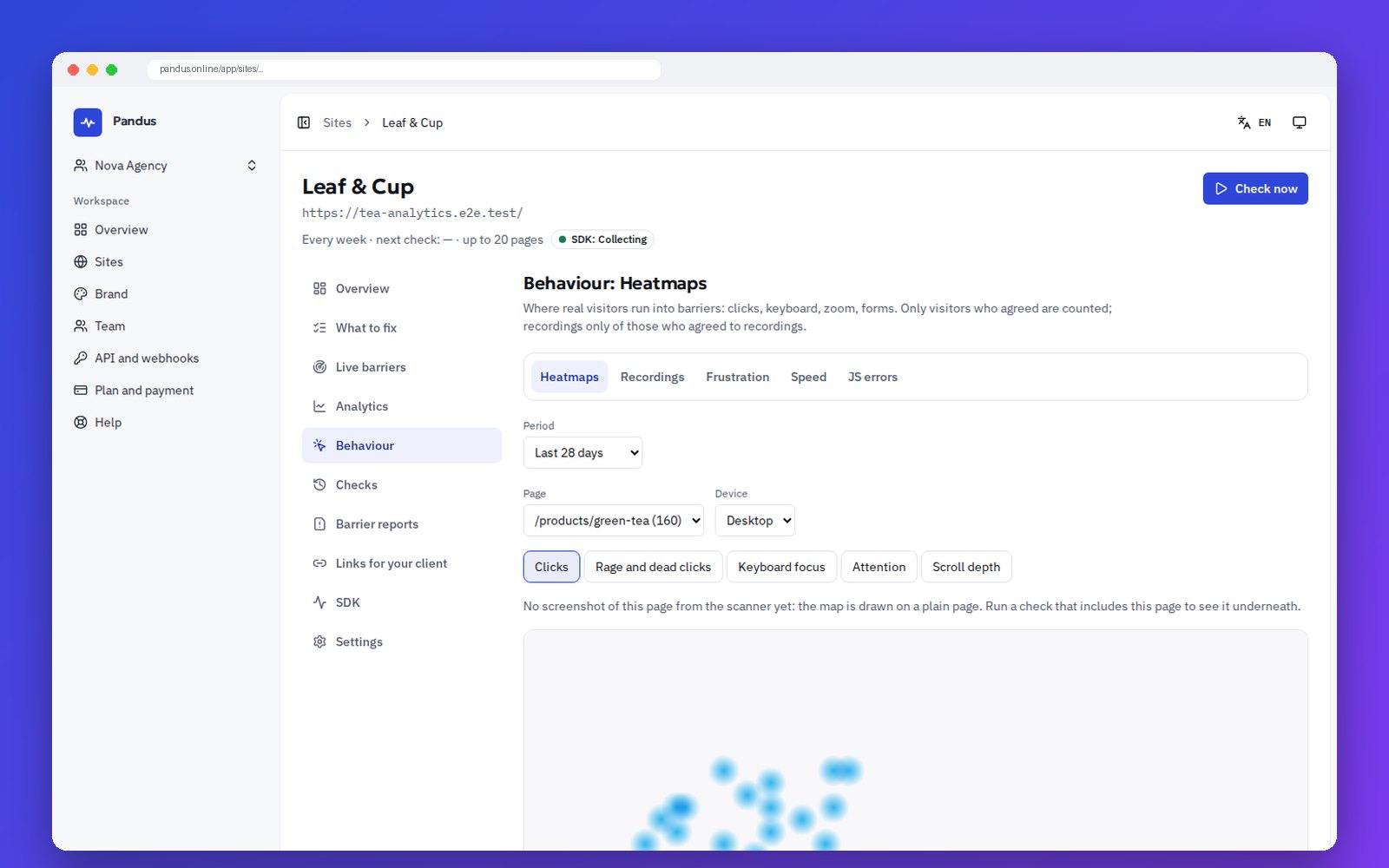
What a scanner sees, and what the SDK adds
The weekly scanner checks public pages the way a guest sees them. The SDK works inside real visits, so the two together give a priority based on real traffic.
| Scanner + SDK | Scanner alone | |
|---|---|---|
| Public pages | Yes | Yes |
| Cart, checkout, customer account | Yes | No |
| Open dialogs, menus and states after a click | Yes | Partly |
| Real devices, zoom and keyboard use | Yes | No |
| How many visitors run into a problem | Yes | No |
| Fix order based on real traffic | Yes | No |
| Checks that a fix worked for visitors | Yes | No |
How it works
Three steps, and the second one is your visitors simply using the site.
-
1
Add one line of code
Paste the snippet into your site, confirm the domain, and the dashboard shows “SDK works” as soon as the first visitor agrees.
-
2
Visitors use the site
With their consent, the SDK notices where people get stuck: trapped focus, unlabelled controls, forms that do not explain errors, pages that break when zoomed.
-
3
You get a list of what to fix first
Findings of the scanner, live signals, the browser extension and barrier reports join one list, ranked by severity and real traffic.
What the SDK notices in real visits
Each signal is tied to a page, an element and the WCAG success criterion behind it. It describes the page, never the person.
| Signal | What it means | WCAG |
|---|---|---|
| Focus trap | Tab and Shift+Tab go round in a few elements and Esc does not get out | 2.1.2 |
| Lost focus | After closing a dialog or removing an element, focus falls back to the page body | 2.4.3 |
| Invisible focus | The focused element shows no visible change | 2.4.7, 2.4.11 |
| Focus under an overlay | A sticky header or a banner covers the focused element | 2.4.11 |
| Focus order jumps | The next focus jumps against the visual order of the page | 2.4.3 |
| Control without semantics | A clickable element has no role, no name and cannot be reached with the keyboard | 4.1.2, 2.1.1 |
| Focus inside hidden content | Focus lands in a part hidden from assistive technology | 4.1.2 |
| Form errors not announced | A form fails without aria-invalid or a linked message, or is sent again and again | 3.3.1, 3.3.3 |
| Reflow and zoom | Sideways scrolling at 320 CSS px or when zoomed, cut-off text | 1.4.10, 1.4.4 |
| Autoplay with sound | Video or audio with sound starts without a click | 1.4.2 |
| Live axe | axe-core runs on a small sample of real page states: open dialogs, the cart, the account | by rule |
| Rage and dead clicks | Repeated clicks with no reaction from the page | — |
A skip link that visitors actually use is counted too, as a positive signal. Barrier reports from the “Report a barrier” form are linked to the page and its signals.
One list of what to fix first
Rules and rule cards decide the order and the advice. No AI guesses.
-
Four sources, one list
Scanner findings, live signals, extension checks and barrier reports, each problem with badges of where it came from. Filter by status, page, WCAG, severity and assignee.
-
Priority from real traffic
Severity × share of affected sessions × page traffic × confirmation by scanner and visitors × barrier reports. A barrier on the step before a purchase ranks higher.
-
A card for every problem
Why it matters for the business, where it happens, the evidence (screenshot, selector, live signal chart, recordings, heatmap excerpt) and how to fix it on Shopify, WooCommerce, PrestaShop, Shoptet or in code.
-
Fixed, then confirmed
Open → in progress → fixed → confirmed when the live signal drops below the threshold, or “returned”. “Check the fix” runs the scanner again and watches live traffic.
-
Health index 0–100
One number from the scanner and live barriers, with the formula one click away and the trend over time.
-
Weekly digest and spike alerts
New barriers, what was confirmed fixed and sudden spikes, by e-mail and Telegram. A sharp rise sends an alert at once.
Behaviour: heatmaps, recordings, frustration, speed
See how people move through the page, with every text and field masked before anything leaves their browser.
-
Heatmaps
Clicks, keyboard focus, scroll depth, attention, rage and dead clicks, on a screenshot of the page, per page template and device. Every layer also has a table.
-
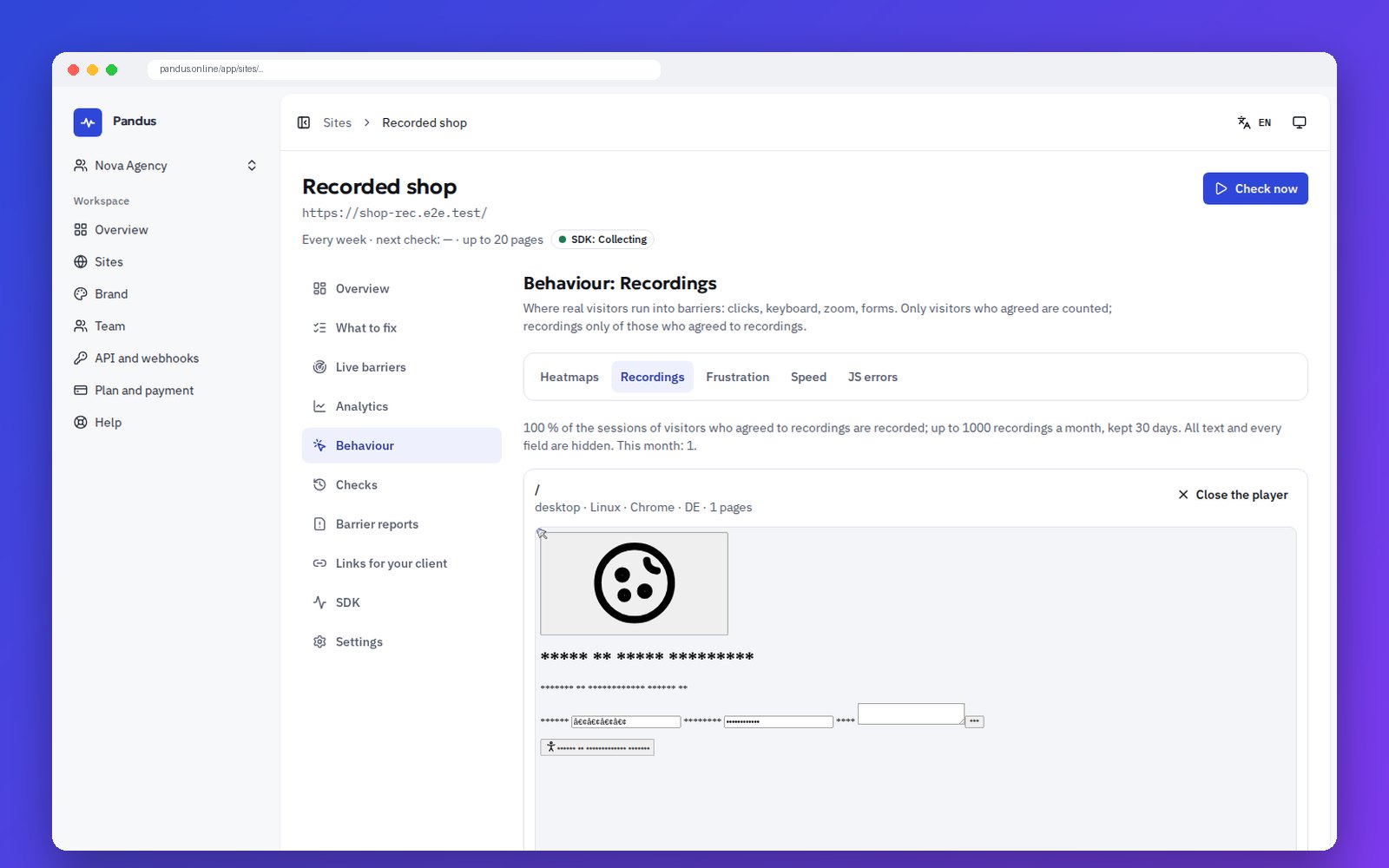
Session recordings
Recorded with rrweb only after consent to “recordings”: all text and all fields masked, payment fields never shown, a share of sessions and a daily limit from your plan.
-
A player you can use with the keyboard
Skip idle time, change speed, jump to barrier and frustration moments on the timeline, share a link to a moment, open the problem card.
-
Frustration
Rage, dead and error clicks, quick returns, excessive scrolling and abandoned forms with the last field (never its value), by page.
-
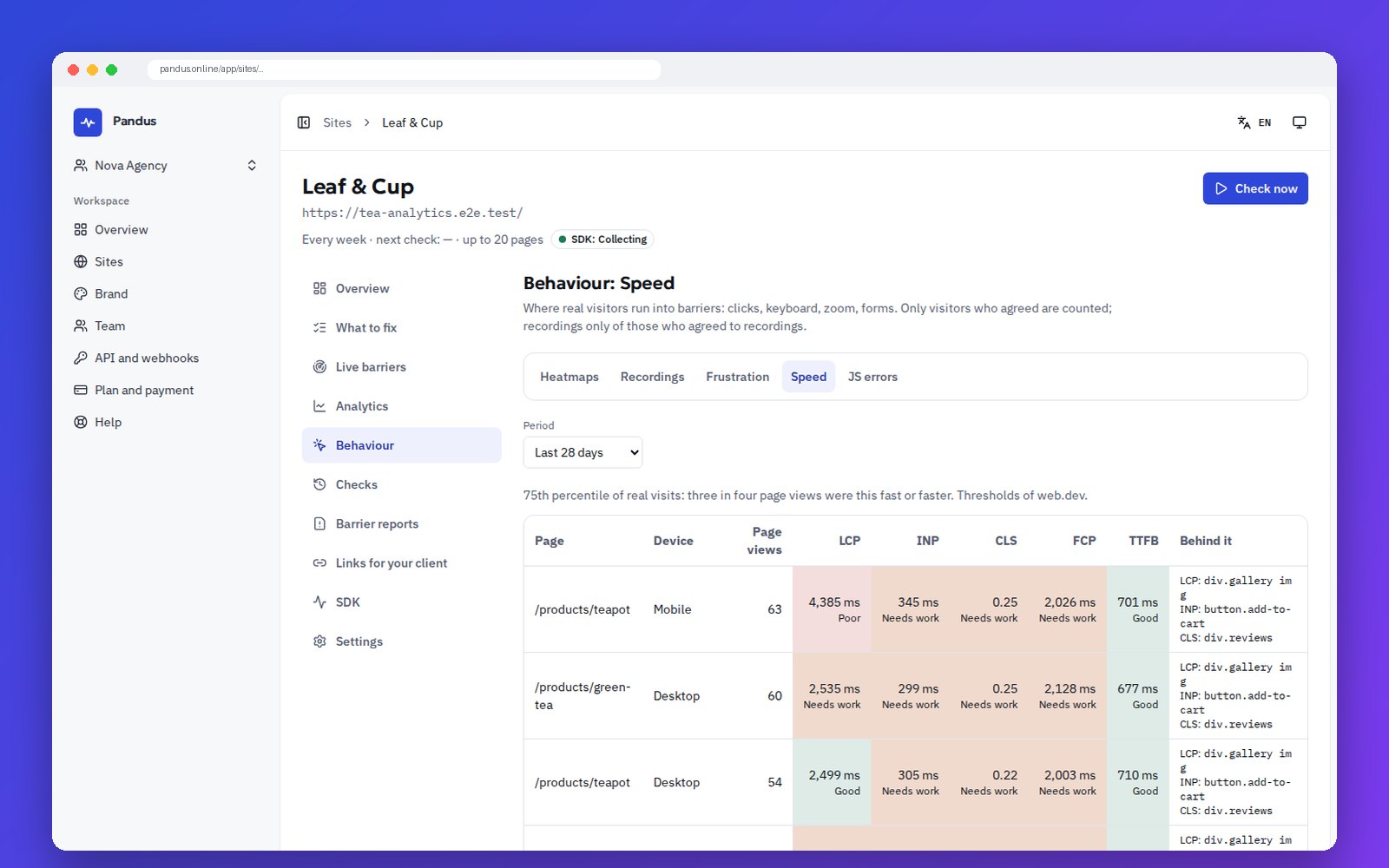
Speed
Web Vitals per page and device at p75: LCP, INP, CLS, FCP and TTFB, with the element behind each.
-
JavaScript errors
Grouped by message, with stacks cleaned of URLs and personal data, linked to the clicks that caused them.
Privacy is built in, not bolted on
Pandus processes visitor data for you as a processor, under our data processing agreement.
- Consent first. Nothing is sent, stored or set before the visitor agrees. Our own accessible banner, or the answer of Cookiebot, CookieYes, Complianz or Google Consent Mode.
- No profiling of people. No detection of screen readers or disabilities, no labels on sessions, no filters by input method.
- Masking by default. Field values are never collected. Recordings mask all text; payment and blocked parts stay masked always.
- Clean URLs and no IP in storage. Only allow-listed query parameters are kept; e-mails and tokens are cut. The IP gives the country and is dropped.
- UK and EU storage. Events in London, recordings in Germany, retention set by your plan, deletion on request.
Masked in the browser, not afterwards
Recordings show the layout and what people did, not what they typed or read. Text turns into asterisks and fields into dots in the visitor’s browser, before a single byte is sent.
- Inputs, payment fields and elements marked data-pandus-mask or data-pandus-block are always hidden.
- You can show the text of selected elements, such as navigation, but never of fields.
- Pages that you exclude, such as the payment step or the account, are not recorded at all.
Analytics at GA4 level, after consent
Everything you would use GA4 for, plus barriers on every step, in one place.
-
Reports
Realtime, traffic with period comparison and notes, sources and channels with first and last click, pages, events, conversions, audience by country, device, browser and language.
-
Funnels, paths and retention
Open and closed funnels with the barriers between steps, paths to and from an event, weekly cohorts.
-
E-commerce
The GA4 e-commerce schema: products, cart, checkout steps and revenue in your currency.
-
Events without code
Click a selector, view a URL, submit a form, an element becomes visible: define it in the dashboard or pick the element in the extension, and it counts back in time.
-
Smart events
Add to cart, checkout, purchase, sign-up, login, contact and lead are recognised in seven languages. You confirm or switch them off.
-
Report builder, alerts, API
Dimensions × metrics as a table or chart, saved reports, alerts such as “conversion fell by 30 %”, CSV export and the read API.
Your site, live, in the browser extension
Open your own site and see the SDK data on top of it. The extension asks for no new permissions.
-
Barrier markers on the page
“Focus got stuck here 214 times in 7 days”, right on the element, with the problems of this page and their status.
-
Heatmap over the live page
Clicks, focus and rage clicks drawn over the page you have open, in a Shadow DOM layer that does not touch your styles.
-
SDK debugger
Is the SDK on this page, which modules run, the consent state, CSP errors and the live event stream of this tab.
-
Check a fix from the page
A local axe check plus a request to the scanner; the problem waits for confirmation from live visitors.
For agencies
All client sites, under your brand, with something to show before the code is even installed.
-
Portfolio
Every client site in one table: health index, live barriers, traffic, SDK status and trend, with a “got worse this week” filter.
-
Client link
A read-only link for the client with the sections you choose. Analytics and recordings stay off until you switch them on.
-
SDK blocks in white-label reports
Live barriers, what was fixed and confirmed, conversion before and after, in your logo and colours.
-
Demo mode
Open the dashboard on Pandus demo data, clearly marked as an example, to show a client the value before installation.
Works with your stack
-
Any website
One script tag in the head. Wix, Tilda, Webflow and others through their custom code field; single-page apps are followed through the History API.
-
WordPress and WooCommerce
The Pandus plugin adds the SDK with one button and sends WooCommerce orders from the server, so a blocker in the browser does not lose a purchase.
-
Shopify
Paste the snippet into theme.liquid. Your store’s consent banner passes the visitor’s choice to the SDK.
-
Google Tag Manager
A tag template to install the SDK, and an optional import of your dataLayer events.
-
Events from your server
An endpoint in the style of the GA4 Measurement Protocol for orders, refunds and other backend events.
-
MCP server for AI assistants
Connect Pandus to Claude, Cursor or another MCP client: the assistant reads what to fix, the rule card and live barriers, and starts a re-check after a fix, only with the rights in your token.
Open source
The browser SDK is open source under the MIT licence. Anyone can read exactly what it collects and how it masks data before anything leaves the page.
-
Source code on GitHub
github.com/Pandus-Online/Pandus-SDK · MIT
Source code on GitHub -
The npm package
@pandus/sdk · Install with npm or yarn, typed, with helpers for React, Next.js, Vue and Nuxt.
The npm package
Limits per plan
The SDK is part of Pro and Agency. Limits are shared by the team’s sites.
| Plan | Sites with the SDK | Events a month | Recordings a month | Events kept, days | Recordings kept, days | Live axe sample |
|---|---|---|---|---|---|---|
| Pro | 1 | 1,500,000 | 300 | 395 | 30 | 2 % |
| Agency 10 | 10 | 6,000,000 | 1,000 | 395 | 30 | 2 % |
| Agency 25 | 25 | 15,000,000 | 2,500 | 395 | 30 | 2 % |
| Agency 50 | 50 | 30,000,000 | 5,000 | 395 | 30 | 2 % |
One page view is about 15 events. Barrier signals are counted separately and are the last to be cut when a quota is reached. Prices are on Pricing.
What the SDK does not do
Honesty is part of the product.
- It does not change or “fix” your site, and it is not an overlay.
- It does not identify people, their health or the assistive technology they use.
- It does not collect what visitors type into fields.
- Automated checks are not a full audit and not legal advice. A manual review is still needed.
Frequently asked questions
Is the Pandus SDK an accessibility overlay?
No. The SDK changes nothing on your site and fixes nothing by itself. It only adds its own elements, the consent banner and the optional “Report a barrier” button. It measures where visitors meet barriers so that your team fixes the code. More on why overlays do not work.
Does the SDK find out which visitors have a disability?
No, and it never tries. Barrier signals are anonymous: they describe the page and the element, not the person. The SDK never labels a person or a session as a screen reader user or as disabled. Display preferences such as reduced motion are shown only as shares, and only when at least 20 sessions stand behind them.
What is collected before a visitor agrees?
Nothing. In the EU, the EEA, the UK and unknown countries the SDK sends no request, sets no cookie and writes nothing to storage until the visitor agrees. Our tests check exactly that. If your site already has a consent tool, the SDK reads its answer and shows no banner of its own.
Where is the data stored?
Events are stored in ClickHouse Cloud in London (UK, which has an EU adequacy decision). Session recordings are stored in Hetzner Object Storage in Falkenstein, Germany. The full list is on the sub-processors page.
Will it slow my site down?
The loader is about 5 KB gzip and loads asynchronously. Modules load only after consent and only when they are switched on. Events go in batches in idle time, and our end-to-end tests check that our code causes no long task over 50 ms.
Which plans include the SDK?
Pro and Agency. The limits per plan are in the table on this page and on Pricing. On Free, the “Report a barrier” button and the accessibility page stay as they are.
Does a clean dashboard mean my site meets the EAA or the ADA?
No. The SDK and the scanner are automated checks, not a full audit, and not legal advice. They show where people get stuck and what to fix first; a manual review is still needed.
Can my agency use it for client sites?
Yes. Agency plans get a portfolio of all client sites, read-only client links, SDK blocks in white-label reports and a demo mode to show the screens before the code is installed.
See where your visitors get stuck
Install the SDK on Pro or Agency, or ask us for the demo dashboard first.